How to Use BULB Mode for Long Exposure Photography
Shoot exposures far longer than your camera’s 30-second limit — without camera shake — by pairing a tripod with a BULB timer you control from your phone.
Master Long Exposure Photography
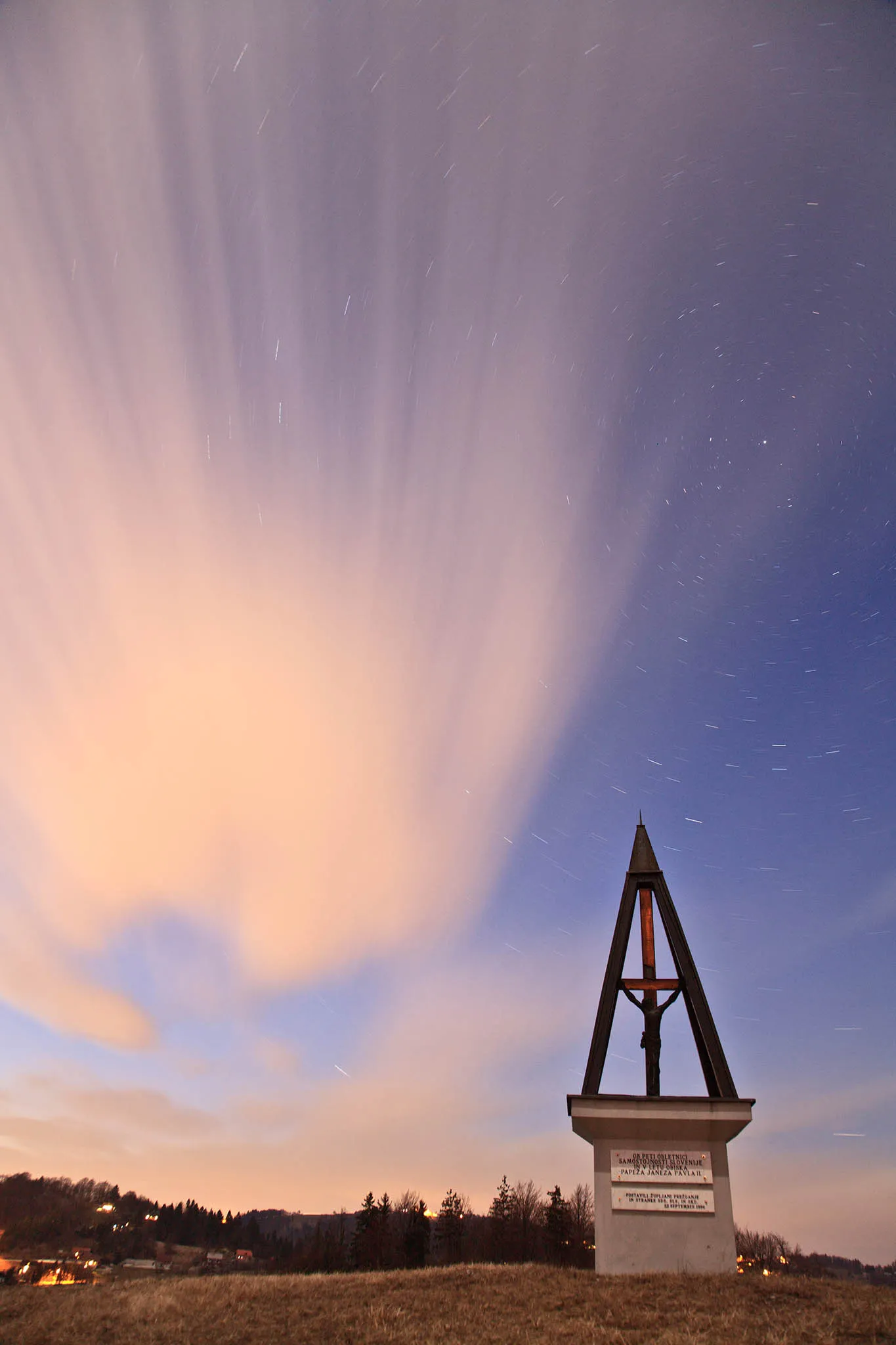
Some of the most striking photographs in any genre — silky waterfalls, star trails circling overhead, glowing rivers of car headlights, fireworks blooming over a skyline — share one thing in common: an exposure that runs far longer than a normal photo. Once you go past a few seconds, you leave your camera’s standard shutter speed range behind and enter BULB mode, the setting built for exposures with no fixed time limit.
BULB mode gives you complete control over exposure length. It also hands you a new problem: how do you hold a shutter open for two minutes without shaking the camera? This guide covers what BULB mode actually is, why it causes camera shake even on a tripod, every option for triggering it remotely, and how to set an exact BULB duration — down to the second — using Shutter+.
What Is BULB Mode?
BULB mode is a camera shooting mode that keeps the shutter open for as long as you hold the shutter button down — or as long as a connected remote tells it to — instead of closing automatically after a preset time. It’s the only way to shoot an exposure longer than your camera’s maximum standard shutter speed, which is 30 seconds on the vast majority of cameras.
The name comes from early film cameras, which used a rubber air bulb connected to the shutter by a tube: squeeze the bulb and the shutter opens, release it and the shutter closes. Digital cameras kept the name and the same basic idea, minus the rubber bulb.
Your camera’s standard shutter speed dial stops at 30 seconds because that range covers the vast majority of everyday photography. Exposures beyond that point are entirely scene-dependent — how dark it is, how much star movement or light trail you want to capture, whether you’re stacking on a neutral density filter — so rather than standardizing a “one size fits all” set of longer speeds, manufacturers hand control over to you. BULB mode is that handoff: you decide exactly how long the shutter stays open.
It’s what makes these long exposure classics possible:
-
Astrophotography and star trails — exposures from several minutes to hours
-
Light trails and light painting — car headlights, sparklers, or a torch drawn through the frame
-
Long exposure landscapes and seascapes — smoothing moving water or drifting clouds
-
Fireworks — holding the shutter open across multiple bursts
-
Night cityscapes — gathering enough ambient light for a properly exposed frame
What You’ll Need
-
A camera with a BULB mode. Most DSLRs and mirrorless cameras have one, though some video-oriented models leave it out.
-
A sturdy tripod. Non-negotiable — more on why below.
-
A way to trigger the shutter without touching the camera. This is the part most photographers get wrong, and it’s the focus of this guide.
The Problem: Why Holding the Shutter Button Causes Camera Shake
Here’s the core issue with BULB mode: by default, you open the shutter by pressing the button, and you close it by releasing the button (or pressing it a second time, depending on your camera). For a 2-second exposure that’s barely noticeable. For a 90-second star trail, it means one of two things:
-
Physically holding your finger on the shutter button for the entire exposure — which is close to impossible to do without introducing small movements the whole time, or
-
Pressing to start, letting go, then pressing again to stop — which introduces a sharp little jolt of movement at the exact moments that matter most: the instant the shutter opens and the instant it closes.
Either way, your finger transmits motion into the camera body at the worst possible time. The result is a photo that looks slightly soft, with point sources of light — stars, distant lights, sparks — smeared into little comets instead of staying crisp. It’s a subtle kind of blur, and it’s one of the most common reasons long exposure photos don’t turn out as sharp as expected, even when everything else about the shot was done right.
Step 1: Eliminate Vibration With a Tripod
A tripod is the foundation of any long exposure — there’s no substitute for it. A few things matter beyond simply owning one:
-
Weight and stability. A lightweight travel tripod can still sway in wind or on soft ground. Hang a bag from the centre column or use a hook to add weight if conditions are breezy.
-
Turn off image stabilization / VR. With the camera locked down, in-lens or in-body stabilization can sometimes hunt for movement that isn’t there, introducing blur instead of preventing it. Switch it off once you’re on a tripod.
-
Level ground, locked legs. Tighten every leg lock and the centre column fully before you start.
A tripod solves the biggest source of camera shake — you holding the camera. It doesn’t solve the next one.
Step 2: Why a Tripod Alone Isn’t Enough — You Still Need a Remote Trigger
Even on the sturdiest tripod, your camera is only as stable as the last thing that touched it. Pressing the shutter button — even gently — transmits a small amount of movement into the camera body right as the exposure begins. In BULB mode, that same problem repeats when you touch the camera again to end the exposure.
This is why serious long exposure photography always pairs a tripod with some way to trigger — and in BULB mode, also stop — the shutter without physically touching the camera. There are a few ways to do that.
Your Remote Trigger Options for BULB Mode
Self-Timer
Every camera has a built-in self-timer, usually a 2-second or 10-second delay between pressing the shutter button and the photo actually being taken. It exists for exactly this problem: press the button, step back, and let any vibration from your touch settle before the shutter fires.
The catch is that a self-timer only helps with the start of an exposure, and only up to your camera’s standard 30-second limit. It doesn’t solve BULB mode’s real challenge, which is controlling — and remotely ending — an exposure that might run for minutes. You’d still need to be at the camera to close the shutter manually, which puts you right back to touching it at the worst possible moment.
Cable Release (Wired Remote)
A cable release is a cord that plugs into your camera’s remote port, with a button on the other end — some include a small lock switch so you can hold BULB mode open without keeping your finger pressed down. It’s inexpensive, reliable, and keeps your hands completely off the camera body during the exposure itself.
The downside: a basic cable release has no idea what time it is. It can hold the shutter open, but it can’t close it for you at a specific moment. You’re watching a stopwatch or your phone and pressing the release again by eye, which makes your exposure time an estimate rather than a precise figure — and you’ve got a dangling cable that can introduce its own tiny vibrations if it catches the wind or snags the tripod.
Standard Wireless Remote
A basic wireless (RF or infrared) remote does the same job as a cable release without the cord — press to open BULB mode, press again to close it. It’s a genuine step up in convenience: no cable limiting how far you can stand from the camera, and nothing that can tug on the tripod.
But it shares the same core limitation as a cable release: it can lock the shutter open, but it can’t count the time for you. You’re still eyeballing a stopwatch and pressing a tiny button in the dark to close the shutter at the right moment — and now you’ve got a separate gadget to charge, carry, and keep track of.
The Best Option: A Wireless Release That Also Times Your Exposure
This is the gap Shutter+ fills. It connects your iPhone or iPad directly to your Canon, Sony, or Fujifilm camera over the camera’s own Wi-Fi network — no cable, no separate remote to charge, no internet or home network required, even far off-grid. But the real advantage for BULB mode is what happens once you’re connected.
It sets your exact BULB duration in advance. Most cameras — and every basic remote — can only hold the shutter open until something closes it manually. Shutter+‘s BULB Timer lets you dial in the exact exposure length you want, in minutes and seconds, up to 60 minutes, before you even open the shutter. Tap to start, and the app closes the shutter automatically at precisely the time you set. No stopwatch, no guessing, no second touch to the camera.
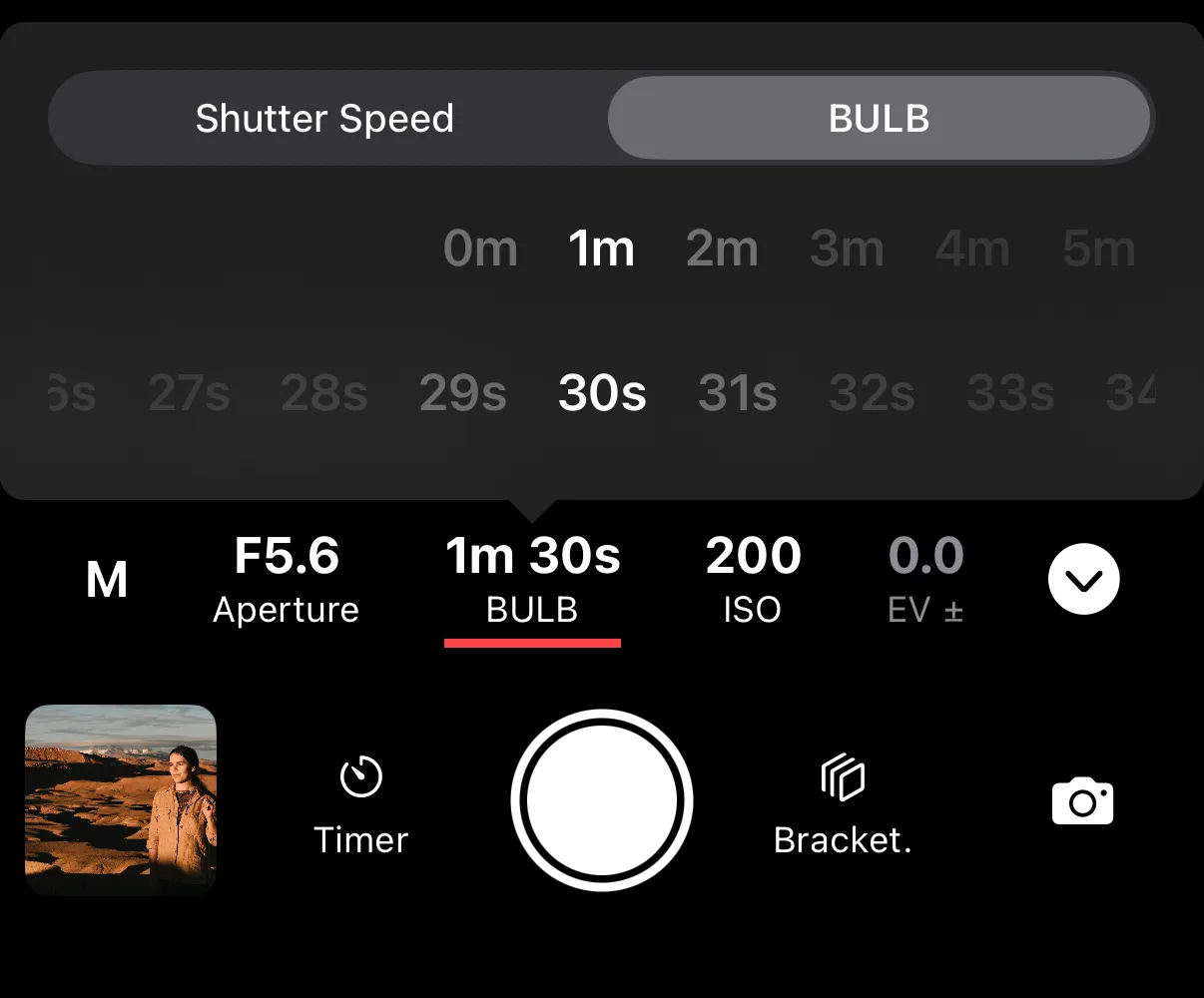
It combines BULB mode with the intervalometer. This is the feature most remotes simply don’t have. Instead of shooting one long BULB exposure, you can set Shutter+ to repeat a timed BULB exposure automatically — firing the same duration over and over with a set interval in between. That combination is exactly how photographers shoot star trail stacks (many shorter exposures blended together in post-processing for a cleaner result with less sensor noise than one very long single exposure) and night sky time-lapses, where each frame in the sequence is itself a long exposure.
Both features live in the same app you’re already using for live view, exposure settings, and everything else — so you can check your histogram and composition on a full-size screen before you commit to a five-minute exposure, rather than squinting at a rear LCD in the dark.
A couple of things worth knowing before you head out:
-
Not every camera supports BULB mode. It’s common on DSLRs and mirrorless cameras but often missing from video-oriented models. Check your camera’s page to confirm support.
-
BULB mode needs a mechanical or electronic first-curtain shutter — it isn’t available with a fully electronic shutter. Electronic first-curtain is the better of the two for long exposures, since it reduces the small vibration the shutter mechanism itself creates at the start of the exposure — fittingly, the same kind of shake this entire guide is about avoiding.
Self-Timer vs. Cable Release vs. Wireless Remote vs. Shutter+
| Self-Timer | Cable Release | Wireless Remote | Shutter+ | |
| No hand contact once exposure starts | ❌ (short delay only) | ✅ | ✅ | ✅ |
| Practical for exposures over 30 seconds | ❌ | ✅ (manually timed) | ✅ (manually timed) | ✅ (auto-timed) |
| Sets an exact BULB duration for you | ❌ | ❌ | ❌ | ✅ |
| Combines BULB with an intervalometer | ❌ | ❌ | ❌ | ✅ |
| Live view and histogram while shooting | ❌ | ❌ | ❌ | ✅ |
| No extra hardware to buy or charge | ✅ | ❌ | ❌ | ✅ (uses your phone) |
How to Shoot a BULB Exposure With Shutter+: Step-by-Step
-
Set up your tripod on stable ground and mount your camera. Turn off image stabilization.
-
Compose and focus, then switch to manual focus so the camera doesn’t hunt for focus in the dark once you start shooting.
-
Put your camera into BULB mode. This step differs slightly by brand:
-
Canon — set the mode dial on the camera itself to BULB (B).
-
Sony — set the mode dial to Manual (M), then select BULB from the shutter speed menu inside Shutter+.
-
Fujifilm — only preset BULB lengths are available, and the exposure time needs to be set to BULB on the camera before connecting to the app.
-
-
Connect Shutter+ to your camera over Wi-Fi.
-
Open the shutter speed menu in the app and select BULB Timer. Dial in your exact exposure length in minutes and seconds.
-
Optional: turn on the intervalometer if you’re stacking exposures for a star trail or shooting a long-exposure time-lapse. Set your interval and the number of exposures, or leave it running until you stop it manually.
-
Step back and trigger the shot from your phone — or your Apple Watch. Your hands never touch the camera.
-
Check the result using Shutter+‘s live view and histogram before you reposition or pack up, so you’re not discovering a problem back at your computer.
Bonus Tips for Sharper Long Exposures
-
Shoot RAW for the most flexibility recovering shadows, highlights, and reducing noise afterward.
-
Cover the viewfinder on DSLRs during long exposures — stray light can leak in through the eyepiece and affect exposure.
-
Stack shorter exposures instead of one very long one for star trails. A sequence of, say, thirty 60-second BULB exposures blended in post gives a cleaner result than one 30-minute exposure — exactly what the BULB Timer and intervalometer combination in Shutter+ is built for.
-
Give vibrations time to settle after touching the tripod — to rotate, refocus, or check something — before starting the next exposure. A couple of seconds makes a real difference.
Summary: Why Shutter+ Is the Best Way to Trigger BULB Mode
Camera shake in long exposure photography almost never comes from wind or a bad tripod — it comes from your own hand touching the camera at the start and end of the shot. Solving that takes more than just getting off a basic remote:
-
Zero contact with the camera once your BULB exposure starts or stops
-
An exact, auto-stopping BULB duration instead of a stopwatch and a guess
-
BULB mode combined with an intervalometer for star trail stacks and long-exposure time-lapses
-
Live view and a histogram on a full-size screen to check your exposure before committing minutes to a single frame
-
No separate hardware to buy, charge, or lose in the dark — it’s the phone already in your pocket
Frequently Asked Questions
What is BULB mode on a camera?
BULB mode is a shutter setting that keeps the shutter open for as long as you hold the button, or as long as a connected remote tells it to, rather than for a fixed preset time. It’s the only way to shoot exposures longer than your camera’s standard shutter speed limit, which is 30 seconds on most cameras.
Why can’t I set a shutter speed longer than 30 seconds?
Most cameras cap their standard shutter speed dial at 30 seconds because exposures beyond that point are highly scene-dependent — how dark it is, how much movement you want to capture, whether you’re using filters. Rather than standardizing a set of longer speeds, manufacturers hand full control to the photographer through BULB mode instead.
Why is my long exposure blurry even though I used a tripod?
The most common cause is camera shake from your hand touching the shutter button to start or stop the exposure. A tripod stops the camera from moving on its own, but it can’t stop the small jolt your finger transmits into the body — that’s what a remote trigger is for.
Do I need a remote shutter release for BULB mode photography?
Yes, for anything beyond a couple of seconds. Without one, you either hold the shutter button down for the full exposure, which introduces continuous vibration, or press it twice, jolting the camera at the exact moments the shutter opens and closes.
Can I use the self-timer instead of a remote for long exposures?
A self-timer helps avoid shake at the very start of a normal, under-30-second shot, but it doesn’t solve BULB mode’s real problem — you’d still need to be at the camera to end a multi-minute exposure manually, which brings the shake risk right back.
Can I set an exact BULB exposure duration?
With a basic cable release or wireless remote, no — they can only lock the shutter open until you close it manually, timed by eye. Shutter+‘s BULB Timer lets you set an exact duration in minutes and seconds, up to 60 minutes, and closes the shutter automatically.
Can BULB mode be combined with an intervalometer?
Yes, in Shutter+. Combining the BULB Timer with the intervalometer lets you repeat a timed long exposure automatically — the basis for star trail stacking (blending multiple shorter exposures for a cleaner result) and long-exposure time-lapses.
Does BULB mode work with any camera or shutter type?
Not every camera has a BULB mode — it’s common on DSLRs and mirrorless cameras but often missing from video-focused models, so it’s worth checking your specific camera. BULB mode also requires a mechanical or electronic first-curtain shutter; it isn’t available with a fully electronic shutter.
Ready to try it? See if your camera is supported, or head straight to the Shutter+ for Canon, Sony, or Fujifilm page. Every plan includes a 7-day free trial. See pricing.