White Balance
White balance adjusts the color temperature of your photos so that whites appear neutral under different lighting conditions.
Tap the white balance indicator on the remote control screen to select a different option. Which options are available depends on your camera model.
If you shoot RAW, white balance can be adjusted non-destructively in post-processing. For JPEG, it’s applied permanently in-camera.
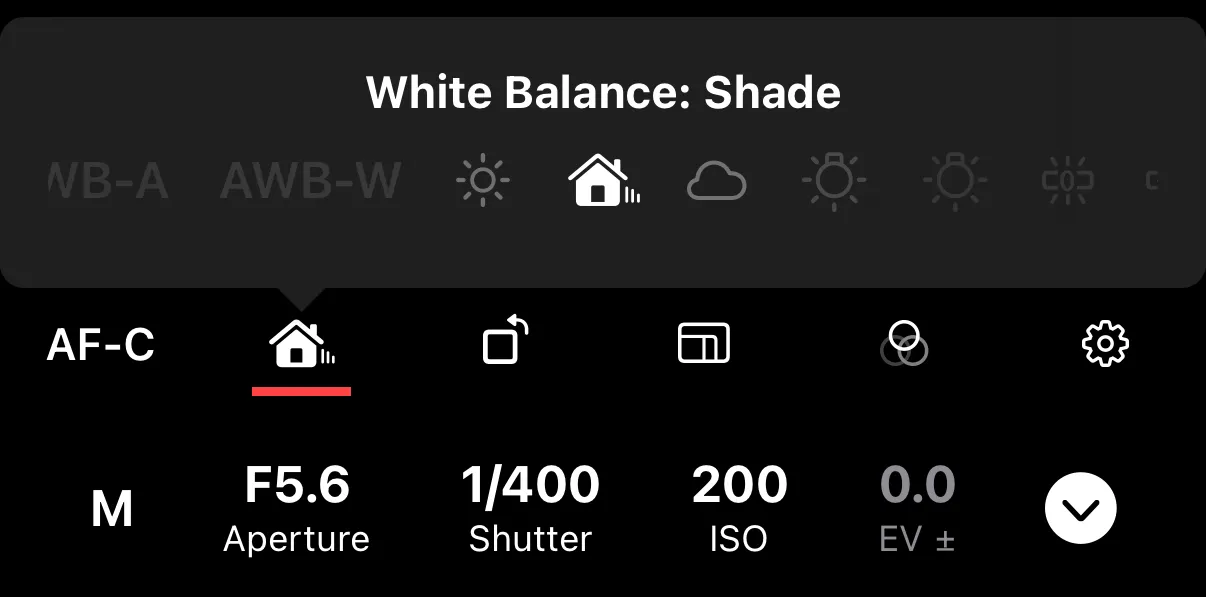
Options
AWB (auto) — the camera adjusts white balance automatically. Some cameras let you choose a priority:
- AWB-A (Ambiance) — preserves the warm or cool tone of the ambient lighting.
- AWB-W (White) — makes whites appear strictly neutral regardless of lighting.
Presets — fixed color temperatures for common lighting:
| Preset | Typical Use |
|---|---|
| Daylight | Outdoor sunlight |
| Shade | Open shade (cooler than direct sun) |
| Cloudy | Overcast skies |
| Tungsten | Indoor incandescent/halogen bulbs |
| Fluorescent | Fluorescent office lighting |
| Flash | When using a flash |
| Incandescent | Similar to Tungsten |
| Underwater | Underwater photography |
Custom — uses a custom white balance preset saved on the camera. Some cameras support multiple custom slots.
Color Temperature (Kelvin) — set an exact color temperature in Kelvin. Lower values (e.g., 3000K) produce warmer (more orange) tones; higher values (e.g., 7000K) produce cooler (more blue) tones.